What this generator actually works out
Minecraft is built out of cubes, so a circle has to be approximated. This tool does the approximation for you and shows exactly which blocks to place, row by row, for any width from 3 to 256 blocks.
The rule is a single distance test. Each grid square has a centre point. The tool measures the distance from that centre to the centre of the circle and places a block whenever the distance is within the radius, which is half the diameter. Nothing else is involved: no template table, no hand-tuned offsets, no game files. That matters because it means the same input always produces the same layout, at every size, and you can check any single block yourself with a ruler on graph paper.
For a 15-block circle the radius is 7.5, so a square 7 blocks out from the centre lands inside and gets a block, while the diagonal corner at 7 across and 7 down is 9.9 away and stays empty. That is why the corners of the grid are always missing, and it is the entire reason a pixel circle looks round at all.
Why count the blocks before you start
A 41-block circle drawn as a thin ring is 112 blocks. Filled, it is 1,313. That is the difference between two stacks of stone and twenty-one of them, and it is the difference between one trip to the mine and five. Survival builds fail on materials far more often than they fail on layout, so the block count is printed above the grid the moment you change a number.
The reference table further down this page lists ring, disc, dome and sphere counts for the diameters people actually use, so you can size a build to the stone you have rather than the other way round.
Three worked examples
A 15-block round tower wall
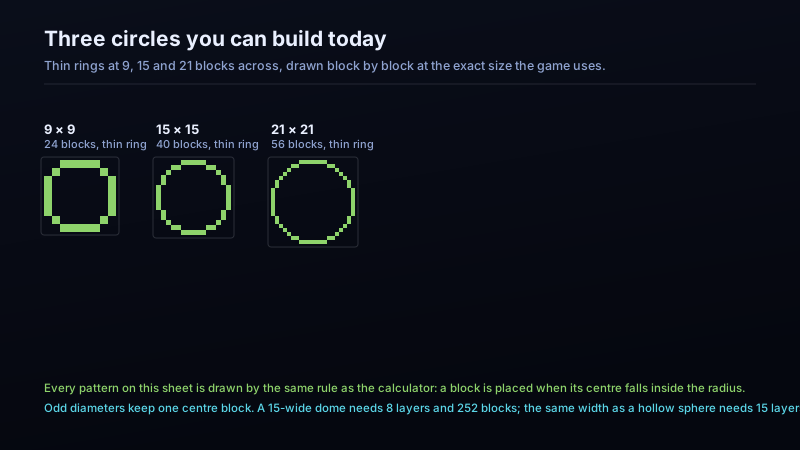
Set the shape to thin ring and the width to 15. The tool reports 40 blocks for a single layer. A tower 12 blocks tall is 12 identical layers, so the wall costs 480 blocks, which is 7 stacks and 32 blocks. Build one layer, count it against the grid, then copy that layer upward — the tool's text-grid export exists precisely so you can keep the pattern beside the build.
A 21-block courtyard floor
Switch to filled disc and set width to 21. The result is 349 blocks. If you would rather lay the outer ring first to mark the shape on the ground, the wall is 56 blocks and the inside is the remaining 293. Both figures come from the same run, so the two halves always add up exactly.
A 15-block dome roof
Choose dome and width 15. It reports 8 layers and 252 blocks in total. The bottom layer is the full 15 across, and the layers shrink as you climb: 15, 15, 14, 14, 13, 11, 9, then 5 at the top. Slide the layer bar to see each one. Because each layer is a ring rather than a solid disc, the roof is hollow and you can light it from inside.
Circle size reference chart
| Diameter | Thin ring 1 block | Thick ring 2 blocks | Filled disc | Dome layers / blocks | Sphere shell layers / blocks |
|---|---|---|---|---|---|
| 5 (5×5) | 12 | 20 | 21 | 3 / 32 | 5 / 52 |
| 7 (7×7) | 16 | 28 | 37 | 4 / 56 | 7 / 96 |
| 9 (9×9) | 24 | 44 | 69 | 5 / 92 | 9 / 160 |
| 11 (11×11) | 28 | 52 | 97 | 6 / 140 | 11 / 252 |
| 13 (13×13) | 36 | 68 | 137 | 7 / 196 | 13 / 356 |
| 15 (15×15) | 40 | 76 | 177 | 8 / 252 | 15 / 464 |
| 17 (17×17) | 48 | 88 | 225 | 9 / 340 | 17 / 632 |
| 19 (19×19) | 52 | 100 | 293 | 10 / 416 | 19 / 780 |
| 21 (21×21) | 56 | 108 | 349 | 11 / 496 | 21 / 936 |
| 25 (25×25) | 68 | 132 | 489 | 13 / 700 | 25 / 1332 |
| 31 (31×31) | 84 | 164 | 749 | 16 / 1084 | 31 / 2084 |
| 41 (41×41) | 112 | 220 | 1313 | 21 / 1888 | 41 / 3664 |
| 51 (51×51) | 144 | 284 | 2053 | 26 / 2924 | 51 / 5704 |
| 61 (61×61) | 172 | 340 | 2933 | 31 / 4160 | 61 / 8148 |
Every number above was computed with the same rule the calculator on this page uses, and re-checked against the area formula: for a filled disc our block count lands within 4% of πr² at every size from 5 to 61 blocks across. Other generators may report a few blocks more or less on the diagonal steps, because they round the ring differently — the layout you see in the grid is what you build.
Even or odd diameter: pick before you build
An odd width has a single block at the exact centre, so the pattern mirrors cleanly from all four sides and a central pillar or fountain lands on a real block. An even width has a 2 × 2 centre instead, which reads slightly flat along the axes but lines up better with walls, doors and corridors built on even numbers.
Neither is more correct. The practical rule is to choose the parity that matches what you are connecting the circle to: an odd circle for a standalone tower or a fountain, an even circle when the circle sits inside a build grid that is already even. The generator states which centre you will get under the results, so there is no guessing after the fact.
Domes and spheres are stacks of rings
A dome is the top half of a sphere and a sphere is the whole thing, so both are produced the same way: the tool slices the ball horizontally and draws a ring for every slice. Slide the layer control to walk the shape from the bottom up.
Two details are worth knowing before you commit materials. First, the widest layer of a dome is the ground layer, and several layers near the ground are almost the same width, which is why a dome looks straighter at its base than you might expect. Second, sphere shells and domes are hollow by design, so the block counts are far lower than a filled shape of the same footprint: a 15-block dome is 252 blocks, where a filled 15-block circle would already be 177 for one layer alone.
Build the layers as circles on the ground first if the dome is large. It is much easier to correct a 31-block ring on flat ground than eight blocks up in the air.
Chunk borders, and when they matter
Anything wider than 16 blocks crosses a chunk boundary. That is not a problem for the shape itself, but it changes how the build behaves: lighting updates, mob spawning and some redstone behaviour are calculated per chunk, and a large circular wall that straddles chunk lines can end up with unlit sections on one side. Tick the chunk border box and the grid will show the boundaries so you can plan walkways, lamps and gates on the lines rather than discovering them afterward.
Mistakes this tool is designed to prevent
- Building a corner-first circle. Starting from a square and cutting corners produces the flat-sided shape everyone recognises as wrong. Start from the centre and work outward, or copy the grid.
- Trusting a remembered template. A 21-block circle has 349 filled blocks; nobody holds that in their head. Use the chart.
- Forgetting the second and third layers differ. On a dome they do; on a tower they do not. The layer slider makes the difference obvious in one click.
- Counting stacks as 64 exactly. A 480-block wall is 7 stacks plus 32, so buy or mine the remainder as well. The material line always shows both parts.
- Building an even circle against odd walls. A 2 × 2 centre will not line up with a single-block doorway. Check the centre note before laying the first block.
Where the geometry comes from
The distance test used here is the same midpoint approximation taught in computer graphics for drawing circles on a pixel grid, and the same reasoning builders apply when they plot a circle on graph paper. We verified the implementation in two ways before publishing it: the filled-disc block count was compared against the area of a circle (πr²) at fourteen diameters from 5 to 61, and every ring was checked to make sure no block is left isolated and no gap breaks the loop. Both checks pass, and the table above is the output of those same checks.
Sources and standards
Where these figures come from
Every count on this page is produced by the geometry described above, then checked against the published reference material below before it was written down.
- Minecraft Wiki — chunk boundaries are 16 × 16 blocks, which is why a large circle crosses several of them.
- Wikipedia — the midpoint circle algorithm used to approximate a circle on a pixel grid.
- Minecraft Wiki — blocks are 1 × 1 × 1, the reason a circle has to be approximated at all.


